> ## Documentation Index
> Fetch the complete documentation index at: https://dripart-chore-sync-comfy-api-v2-spec-0ee014e.mintlify.site/llms.txt
> Use this file to discover all available pages before exploring further.
# Qwen-Image-Layered ComfyUI Workflow Example
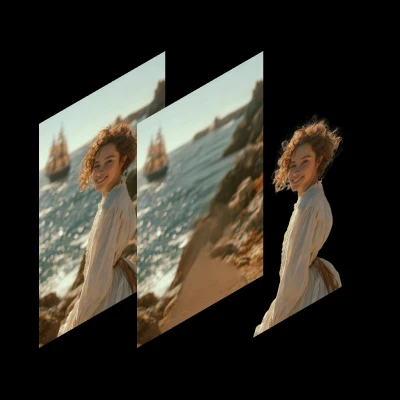
> Qwen-Image-Layered is a model capable of decomposing an image into multiple RGBA layers, enabling inherent editability through layer decomposition.
**Qwen-Image-Layered** is a model developed by Alibaba's Qwen team that can decompose an image into multiple RGBA layers. This layered representation unlocks inherent editability: each layer can be independently manipulated without affecting other content.
**Key Features**:
* **Inherent Editability**: Each layer can be independently manipulated without affecting other content
* **High-Fidelity Elementary Operations**: Supports resizing, repositioning, and recoloring with physical isolation of semantic components
* **Variable-Layer Decomposition**: Not limited to a fixed number of layers - decompose into 3, 4, 8, or more layers as needed
* **Recursive Decomposition**: Any layer can be further decomposed, enabling infinite decomposition depth
**Related Links**:
* [Hugging Face](https://huggingface.co/Qwen/Qwen-Image-Layered)
* [Research Paper](https://arxiv.org/abs/2512.15603)
* [Blog](https://qwenlm.github.io/blog/qwen-image-layered/)
## Qwen-Image-Layered workflow
Make sure your ComfyUI is updated.
* [Download ComfyUI](https://www.comfy.org/download)
* [Update Guide](/installation/update_comfyui)
Workflows in this guide can be found in the [Workflow Templates](/interface/features/template).
If you can't find them in the template, your ComfyUI may be outdated.
If nodes are missing when loading a workflow, possible reasons:
1. You are not using the latest ComfyUI version (Nightly version)
2. Some nodes failed to import at startup
* [Cloud](https://cloud.comfy.org) will update after ComfyUI stable release.
So, if you find any core node missing in this document, it might be because the new core nodes have not yet been released in the latest stable version. Please wait for the next stable release.
Qwen-Image-Layered Decomposition
Decompose an image into editable RGBA layers for recolor, replace, resize, and reposition workflows.
 Download the JSON workflow file
Run ComfyUI online with zero setup
**Input materials**
Upload this file to `LoadImage` node **74**:
`LoadImage` node 74 · `coastal_smiling_woman.png`

## Model links
**text\_encoders**
* [qwen\_2.5\_vl\_7b\_fp8\_scaled.safetensors](https://huggingface.co/Comfy-Org/HunyuanVideo_1.5_repackaged/blob/main/split_files/text_encoders/qwen_2.5_vl_7b_fp8_scaled.safetensors)
**diffusion\_models**
* [qwen\_image\_layered\_bf16.safetensors](https://huggingface.co/Comfy-Org/Qwen-Image-Layered_ComfyUI/blob/main/split_files/diffusion_models/qwen_image_layered_bf16.safetensors)
**vae**
* [qwen\_image\_layered\_vae.safetensors](https://huggingface.co/Comfy-Org/Qwen-Image-Layered_ComfyUI/blob/main/split_files/vae/qwen_image_layered_vae.safetensors)
**Model Storage Location**
```
📂 ComfyUI/
├── 📂 models/
│ ├── 📂 text_encoders/
│ │ └── qwen_2.5_vl_7b_fp8_scaled.safetensors
│ ├── 📂 diffusion_models/
│ │ └── qwen_image_layered_bf16.safetensors
│ └── 📂 vae/
│ └── qwen_image_layered_vae.safetensors
```
## FP8 version
By default we are using bf16, which requires high VRAM. For lower VRAM usage, you can use the fp8 version:
* [qwen\_image\_layered\_fp8mixed.safetensors](https://huggingface.co/Comfy-Org/Qwen-Image-Layered_ComfyUI/blob/main/split_files/diffusion_models/qwen_image_layered_fp8mixed.safetensors)
Then update the **Load Diffusion model** node inside the [Subgraph](/interface/features/subgraph) to use it.
## Layers and output
The number of layers is set by the `layers` widget on the **Empty Qwen Image Layered Latent** node inside the [Subgraph](/interface/features/subgraph).
This model regenerates the full image as well as the layers, so a generation always decodes to `layers + 1` images:
| `layers` | Images decoded | Contents |
| ---------------------- | -------------- | ----------------------------- |
| `0` | 1 | The full image only |
| `2` (template default) | 3 | The full image, then 2 layers |
| `5` | 6 | The full image, then 5 layers |
**The first image is the full image, not a layer.** In the image to layers workflow it reproduces the input image, so discard it when you only want the layers. `layers` accepts `0`, which gives you that image on its own.
**Compositing all of the layers back together recreates the full image.** Use it as a check: if stacking the layers does not reproduce the first image, the decomposition did not do what you wanted.
### How the layers become separate images
The **Empty Qwen Image Layered Latent** node allocates a 5D latent shaped `[batch_size, 16, layers + 1, height // 8, width // 8]`. The layers sit on the third axis, the same temporal axis that video models use for frames. The **LatentCutToBatch** node with `dim` set to `t` moves that axis into the batch dimension, so after **VAE Decode** each layer is a separate image in the batch.
A layer's position in the stack is therefore its index in the batch, counting from the full image at index 0. There is no z-index field and no per-layer metadata carrying that order, so reordering or filtering the batch reorders the layers.
The Qwen-Image-Layered VAE decodes to 4 channels, so the decoded layers carry an alpha channel.
## Workflow settings
### Sampler settings
This model is slow. The original sampling settings are steps: 50 and CFG: 4.0, which will at least double the generation time.
### Input size
For input size, 640px is recommended. Use 1024px for high-resolution output.
### Prompt (optional)
The text prompt is intended to describe the overall content of the input image, including elements that may be partially occluded (e.g., you may specify the text hidden behind a foreground object). It is not designed to control the semantic content of individual layers explicitly.
Download the JSON workflow file
Run ComfyUI online with zero setup
**Input materials**
Upload this file to `LoadImage` node **74**:
`LoadImage` node 74 · `coastal_smiling_woman.png`

## Model links
**text\_encoders**
* [qwen\_2.5\_vl\_7b\_fp8\_scaled.safetensors](https://huggingface.co/Comfy-Org/HunyuanVideo_1.5_repackaged/blob/main/split_files/text_encoders/qwen_2.5_vl_7b_fp8_scaled.safetensors)
**diffusion\_models**
* [qwen\_image\_layered\_bf16.safetensors](https://huggingface.co/Comfy-Org/Qwen-Image-Layered_ComfyUI/blob/main/split_files/diffusion_models/qwen_image_layered_bf16.safetensors)
**vae**
* [qwen\_image\_layered\_vae.safetensors](https://huggingface.co/Comfy-Org/Qwen-Image-Layered_ComfyUI/blob/main/split_files/vae/qwen_image_layered_vae.safetensors)
**Model Storage Location**
```
📂 ComfyUI/
├── 📂 models/
│ ├── 📂 text_encoders/
│ │ └── qwen_2.5_vl_7b_fp8_scaled.safetensors
│ ├── 📂 diffusion_models/
│ │ └── qwen_image_layered_bf16.safetensors
│ └── 📂 vae/
│ └── qwen_image_layered_vae.safetensors
```
## FP8 version
By default we are using bf16, which requires high VRAM. For lower VRAM usage, you can use the fp8 version:
* [qwen\_image\_layered\_fp8mixed.safetensors](https://huggingface.co/Comfy-Org/Qwen-Image-Layered_ComfyUI/blob/main/split_files/diffusion_models/qwen_image_layered_fp8mixed.safetensors)
Then update the **Load Diffusion model** node inside the [Subgraph](/interface/features/subgraph) to use it.
## Layers and output
The number of layers is set by the `layers` widget on the **Empty Qwen Image Layered Latent** node inside the [Subgraph](/interface/features/subgraph).
This model regenerates the full image as well as the layers, so a generation always decodes to `layers + 1` images:
| `layers` | Images decoded | Contents |
| ---------------------- | -------------- | ----------------------------- |
| `0` | 1 | The full image only |
| `2` (template default) | 3 | The full image, then 2 layers |
| `5` | 6 | The full image, then 5 layers |
**The first image is the full image, not a layer.** In the image to layers workflow it reproduces the input image, so discard it when you only want the layers. `layers` accepts `0`, which gives you that image on its own.
**Compositing all of the layers back together recreates the full image.** Use it as a check: if stacking the layers does not reproduce the first image, the decomposition did not do what you wanted.
### How the layers become separate images
The **Empty Qwen Image Layered Latent** node allocates a 5D latent shaped `[batch_size, 16, layers + 1, height // 8, width // 8]`. The layers sit on the third axis, the same temporal axis that video models use for frames. The **LatentCutToBatch** node with `dim` set to `t` moves that axis into the batch dimension, so after **VAE Decode** each layer is a separate image in the batch.
A layer's position in the stack is therefore its index in the batch, counting from the full image at index 0. There is no z-index field and no per-layer metadata carrying that order, so reordering or filtering the batch reorders the layers.
The Qwen-Image-Layered VAE decodes to 4 channels, so the decoded layers carry an alpha channel.
## Workflow settings
### Sampler settings
This model is slow. The original sampling settings are steps: 50 and CFG: 4.0, which will at least double the generation time.
### Input size
For input size, 640px is recommended. Use 1024px for high-resolution output.
### Prompt (optional)
The text prompt is intended to describe the overall content of the input image, including elements that may be partially occluded (e.g., you may specify the text hidden behind a foreground object). It is not designed to control the semantic content of individual layers explicitly.